When you close your account, your login is deleted and you can’t sign in again. If you’re the only person who manages your business, your site closes too.
Before you start
- If you only want a cheaper plan, you don’t need to close your account. See Plans and billing.
- To keep your site but hide a tour, untick Live: show it on your site and in the marketplace on that tour instead.
Close your account
- In your dashboard, click Account.
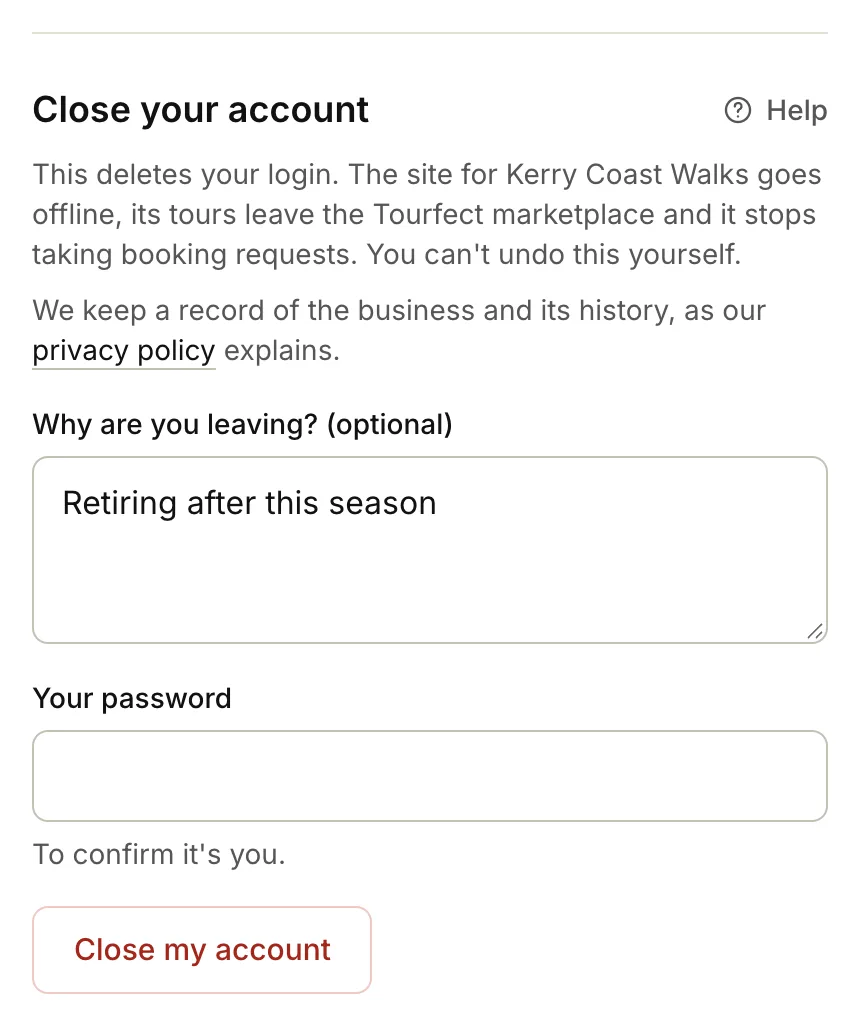
- Scroll down to Close your account.
- If you like, tell us why in Why are you leaving? (optional).
- Type Your password.
- Click Close my account.
- Click OK to confirm.
What happens next
- Your login is deleted, and we email you a confirmation.
- If you’re the only person who manages the business, its site shows a notice that it’s closed, its tours leave the Tourfect marketplace, and it stops taking booking requests.
- If other people manage the business with you, it stays open for them. Only your login is deleted.
- We keep a record of the business and its history, as our privacy policy explains.
You can’t reopen a closed account yourself. If you didn’t mean to close it, reply to the confirmation email straight away.
Related articles
Still stuck? Contact us
Tell us what you're trying to do and where it went wrong. We reply by email within a working day.
Contact us